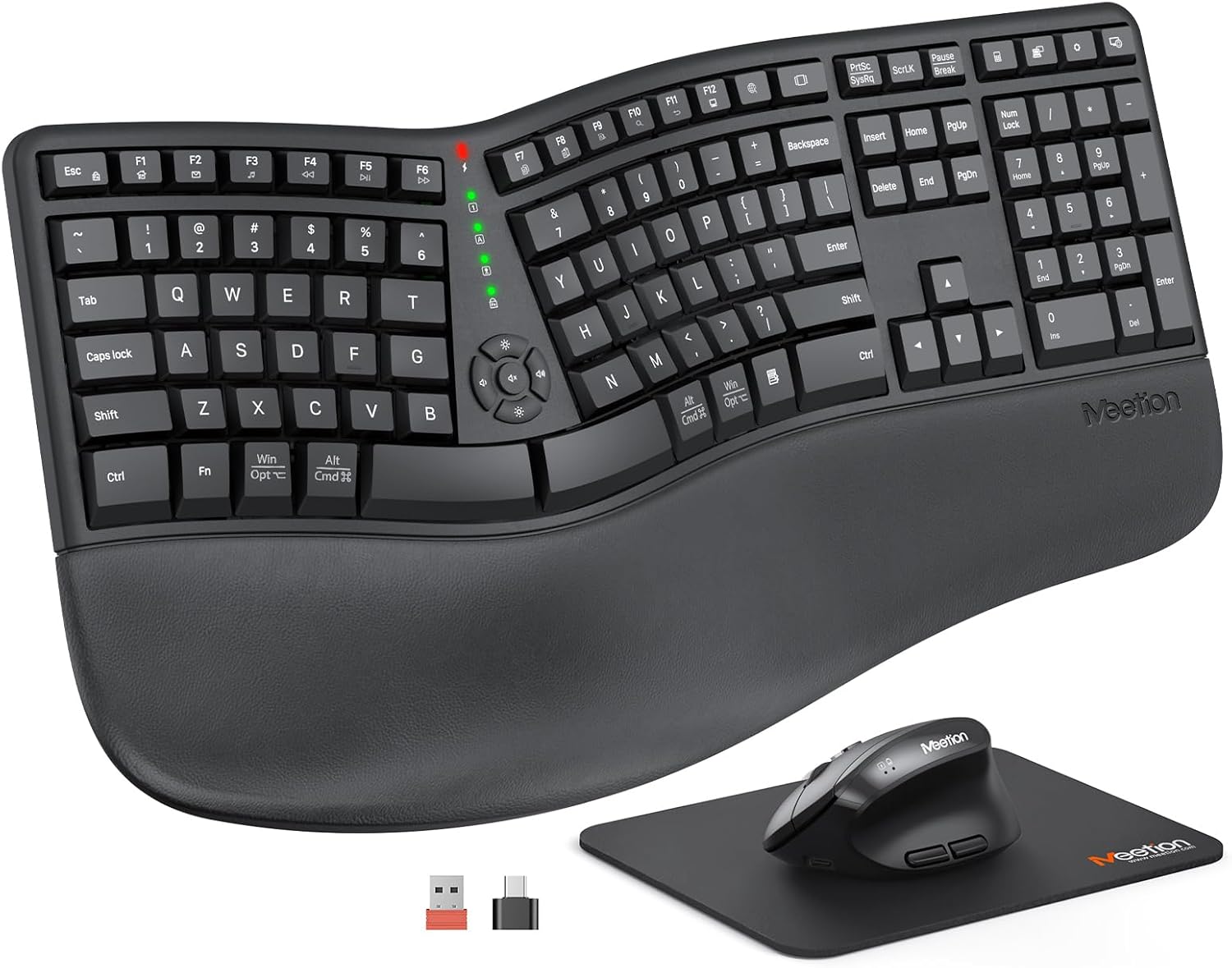
MEETION Ergonomic Keyboard and Mouse, Wireless Keyboard with Vertical Mouse, Split Curved Keyboard with Wrist Rest, Natural Typing USB Receiver Rechargeable Full Size, Windows/Mac/PC/Laptop, Large
Disclosure: As an Amazon Associate, we earn from qualifying purchases. This post contains Amazon affiliate links, and we may earn a commission at no extra cost to you.
Share
## Introduction
So here's the thing—if you spend more than a few hours a day typing, your wrists are probably screaming at you by 5 PM. I know mine were. That constant ache that creeps up after a long work session? It's basically your hands begging for mercy. I'd been using the same flat keyboard for about five years, and my posture was, let's say, "aggressively slouchy." When I got my hands on the MEETION Ergonomic Keyboard and Mouse combo, I was skeptical but hopeful. Fast forward a few weeks, and I'm genuinely impressed with how much better my wrists feel at the end of the day.
## Pros & Cons
**Pros**
- The split design is a game-changer. Each half angles naturally, so your hands aren't forced into that unnatural flat position. Your wrists will thank you.
- That pillowed wrist rest is seriously cushy. It's made of soft, non-slip material that actually stays put instead of sliding around like my old keyboard's did.
- The vertical mouse is ergonomic gold. It genuinely feels more natural than a traditional flat mouse, and the adjustable DPI settings (800-2400) let you fine-tune it for different tasks.
- Wireless connectivity means no cable clutter on my desk, and the USB receiver is reliable with zero lag during gaming or heavy typing sessions.
- Full-size layout means all your keys are there—no compromises like some compact keyboards. Number pad included!
- Battery life is solid. The rechargeable batteries last me about 2-3 weeks with daily use, and charging is quick.
- The curved, concave design conforms nicely to your hand shape, reducing fatigue naturally.
- Great value at $59.39. You're getting quality ergonomic gear without dropping $200+.
**Cons**
- The split design takes maybe 2-3 days to get used to. You'll feel slightly clumsy at first, but muscle memory kicks in fast.
- The mouse took me a minute to figure out the DPI button placement, but once you know where it is, it's intuitive.
- If you're someone who bounces between multiple keyboards frequently, the adjustment period might feel annoying.
## Verdict
Look, I'm not going to promise this keyboard will cure all your typing woes or turn you into a mechanical keyboard enthusiast overnight. But if you're looking for a genuinely ergonomic setup that won't absolutely destroy your bank account, this MEETION combo is legitimately solid.
I've noticed real improvements in wrist soreness and hand fatigue, especially by end-of-day. The build quality feels premium for the price, and both the keyboard and mouse are comfortable enough that you'll actually want to use them. The split design might seem gimmicky at first, but it's backed by actual ergonomic science, and your body will feel the difference.
Whether you're working from home, gaming, or just someone who types a lot, this is a no-brainer upgrade from a standard keyboard-mouse combo. It's affordable, effective, and genuinely makes your typing experience more comfortable. If your wrists have been complaining, do yourself a favor and give this a shot.
**Recommendation: Absolutely worth buying** ✓